Why isn't my spreadsheet working?
If your spreadsheet isn't working with SecureMailMerge, check for file format errors, missing columns, or data import issues in Excel or CSV files.
You need at least one ‘To’ column.
Make sure you have at least one column called “To” which contains the email addresses of the recipients.
Do not use AutoFilters.
SecureMailMerge does not support AutoFilters and the campaign will use all the rows in the spreadsheet even if you have a filter applied.
All columns must have a title
If a column does not have a title in the first row it is regarded as missing and halts the processing, see next item.
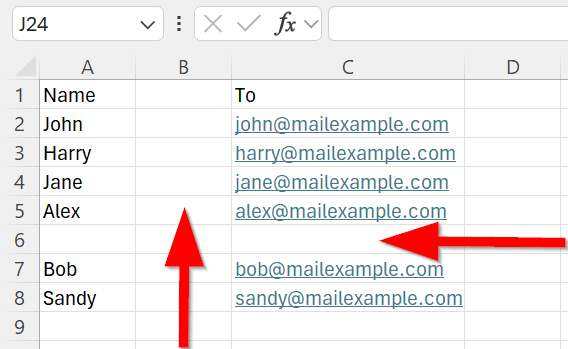
Do not have empty columns or rows.
If empty columns or rows are present, processing will halt at that point. In the following example, the plugin does not see anything to the right of “Name” or below Alex. It will therefore return an error saying that there is an invalid email address on line 2.
Column headers contain illegal characters
If you see an error about illegal characters in column headers, it means one or more of your column names contain character sequences that conflict with the mail merge engine (such as $$, {{, }}, {%, or %}). Rename the affected columns in your spreadsheet and upload again. See Illegal characters in column headers for the full list and how to fix it.
Ready to try SecureMailMerge yourself?
SecureMailMerge for Outlook
Runs inside Outlook, with no external app needed.
Free version, no credit card. A license removes the promotional footer.