Security Overview: How SecureMailMerge Handles Data
How SecureMailMerge processes campaign data on your computer, what we store, our hosting and providers, access controls, compliance and the DPA.
Overview
- Your spreadsheet and message content are processed on your computer inside Outlook. The finished emails are sent through your own Microsoft 365 mailbox via Microsoft Graph, like any email you write yourself.
- The permissions you grant to SecureMailMerge are only used on your computer and are never transferred to any server for processing.
- The only server of ours that the add-in depends on is our licensing server. It checks whether you have a commercial license and never receives campaign data from the add-in.
- Beyond licensing, the add-in reports anonymous usage counts and error reports. Neither contains recipient data, and both can be blocked at the firewall.
- We have no SOC 2 report or ISO 27001 certification of our own. See compliance and contracts.
SecureMailMerge was designed for minimal trust: all primary functionality runs on the user’s computer, with no processing on a server. The add-in’s Microsoft Graph token, which it needs to work with the user’s mailbox, is only ever transmitted between the user’s computer and Microsoft’s servers, never to any other server.
SecureMailMerge is a Microsoft 365 add-in for Outlook built on the modern web add-in architecture. Add-ins run in a sandboxed browser environment inside the Outlook host (Windows, Web or Mac).
Our infrastructure is split into two areas:
- Website and add-in files: deployed as static sites. They store no campaign data.
- Licensing server: stores user licensing information and provides license checks and purchasing.
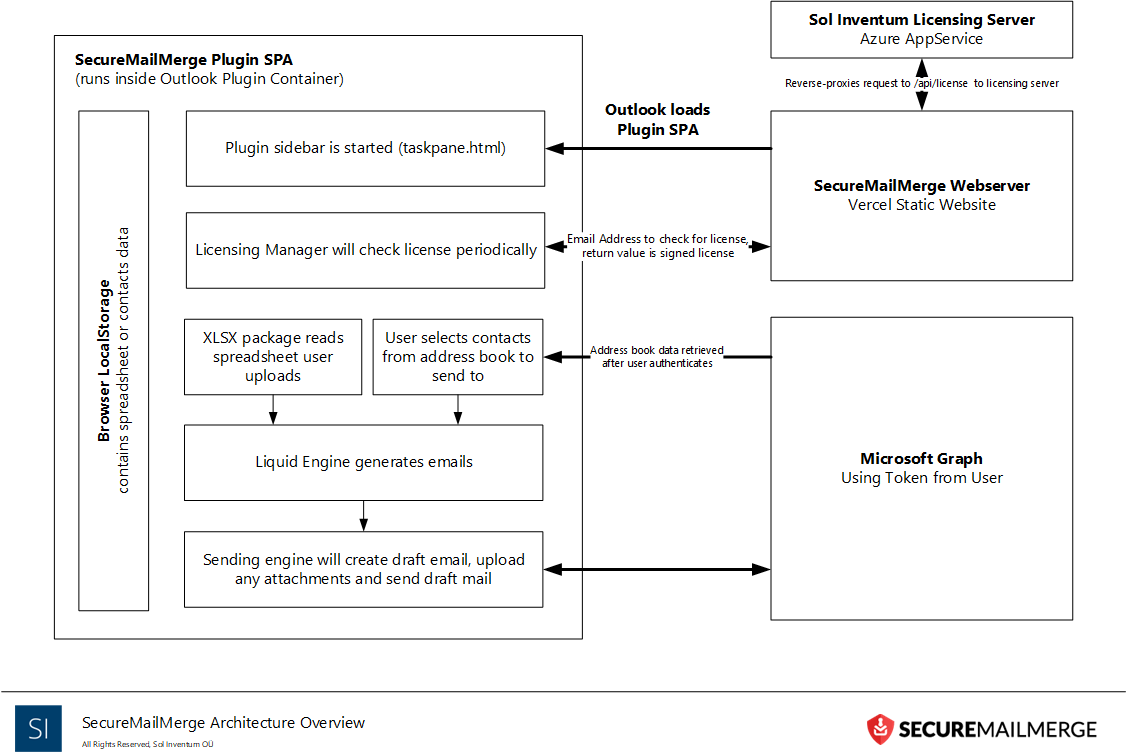
Data flows and retention
| Data | Where it is processed | Stored by us | Retention |
|---|---|---|---|
| Spreadsheet, recipients, message content and attachments | In Outlook on your computer, sent through your mailbox via Microsoft Graph | No | Not applicable |
| License check: your mailbox’s primary email address, product name, timestamp | Licensing server | Free users: no. Licensed users: yes, with a timestamp of last use | Free users: not stored after the check. Licensed users: until the account is deleted |
| Account data when you buy or are assigned a license: user identifiers, name, email address | Licensing server | Yes | Until the account is deleted |
| Billing contact information and transaction number | Licensing server | Yes. No card data | See the note below the table |
| Payment details | Paddle or Microsoft, chosen at checkout | No | Governed by the marketplace’s privacy policy |
| Anonymous usage counts (how often the add-in is used, how many emails are sent) | Our self-hosted Rybbit instance at analytics.solinventum.com | Yes, no recipient data | See our privacy policy |
| Error reports (where an error occurred, its type, diagnostic information) | Sentry | Yes, technical information only | See our privacy policy |
| Web server logs (IP address, browser type, operating system and similar) | Our web servers | Yes | About 30 days |
| Advertising attribution, US visitors who arrive through an ad: pseudonymous click identifier | Cloudflare D1 database | Yes, no name, contact details or campaign content | 90 days |
| Support conversations | Help Scout | Yes | Kept to answer your current and future queries |
When an account is deleted, we delete stored data within 30 days, and usually immediately, unless we need to keep it for legal or legitimate business purposes.
Campaign data never reaches our servers during normal use. If you choose to send us message examples for support, we receive what you send.
Microsoft 365 access and network
Two kinds of Microsoft 365 token
The add-in’s token. To send emails, the add-in needs a security token to access Microsoft 365 on your behalf. Each user consents to the permissions. The token is stored on your computer and only ever transmitted to Microsoft Graph, never to our servers. The refresh token never leaves your Outlook instance: when you close the add-in or Outlook, you sign in again.
The licensing server’s token. When you buy a license, the licensing server asks you to sign in with your Microsoft 365 account. It stores an access token with read-only access to your user information. If you assign licenses to other users, that token is upgraded so the server can read basic information about users in your directory. Searches and their results are not stored.
Why Microsoft warns that the add-in “can send your data to the internet”
When you grant permission, Microsoft warns that the app can send your data to the internet. Because add-ins are programs running inside Outlook, this is theoretically true: once access is granted, Microsoft cannot limit what an add-in does with that data. Talking to Microsoft Graph, which the add-in must do, is itself “the internet”. The warning applies to every add-in that works with Microsoft 365 data.
SecureMailMerge only runs inside Outlook. The spreadsheet is processed and the emails are generated on your computer. Neither is transmitted anywhere other than Microsoft’s own servers (Graph).
Network and firewall
The add-in contacts four hosts:
| Host | Purpose | Required |
|---|---|---|
| Microsoft 365 (Microsoft Graph) | Sending mail, reading contacts and mailbox settings | Yes, already allowed in your tenant |
www.securemailmerge.com | Loading the add-in (GET) and the license check (POST to /api/license) | Yes |
analytics.solinventum.com | Anonymous usage counts (self-hosted Rybbit) | No, can be blocked |
| Sentry | Error reports | No, can be blocked |
The license management portal at licensing.solinventum.com is not contacted by the add-in. Only the people who manage your licenses (the subscription owner and delegated admins) need to reach it, in a browser.
See the firewall requirements.
Hosting and providers
Website and add-in
The website and add-in are hosted globally by Cloudflare Pages. Cloudflare is certified against ISO 27001:2022 (since 2019), ISO 27018:2019 (since 2022) and ISO 27701:2019 as both PII Processor and PII Controller (since 2021), and has completed an AICPA SOC 2 Type II attestation covering Security, Confidentiality and Availability. These certifications cover Cloudflare’s services, not SecureMailMerge.
No campaign data, spreadsheet, recipient data or email content is ever stored on this infrastructure. The one exception is our own advertising measurement, described in the table above. Vulnerability scanning and patch management of the hosting environment are provided by Cloudflare. See Cloudflare’s Trust Hub, ISO certifications and SOC 2 status.
Licensing server
The licensing server is hosted in Microsoft Azure data centers in Europe (the same ones Microsoft 365 uses). Licensing data is stored on database services managed by Microsoft and encrypted at rest. We keep point-in-time and long-term backups so licensing data can be recovered if required. Vulnerability scanning and patch management of the hosting environment are provided by Microsoft. See Microsoft’s data center security documentation.
Subprocessors
Services that process personal data on our behalf:
| Subprocessor | Purpose | Data it receives |
|---|---|---|
| Microsoft Azure | Hosting the licensing server and its database | Account, licensing and billing contact data |
| Cloudflare | Hosting the website and add-in files | Website requests; advertising attribution records for US visitors who arrive through an ad |
| Sentry | Error reports from the add-in | Technical error information only |
| Help Scout | Customer support help desk | What you send us when you contact support |
| Fathom Analytics | Cookie-free website analytics in EU isolation mode | Website visit data |
| HelloSign | Signing a DPA | Name, role and email address of the signee |
For each vendor’s own locations and certifications, see the vendor’s documentation.
Other providers
| Provider | Role |
|---|---|
| Paddle and Microsoft (AppSource) | Merchants of Record for purchases. Their own privacy policies govern the data you give them. Payment card data is stored only with the provider you choose. See Paddle’s security documentation and Microsoft 365 security documentation. |
| Advertising platforms (US only) | Receive a pseudonymous click identifier with install or purchase conversion details. No names, contact details or account data. |
| GitHub | Holds our source code in a private repository. See GitHub’s security documentation. |
| Rybbit | Analytics software we host on our own infrastructure, so no analytics vendor receives this data. |
Access and development controls
- Two-factor authentication is enabled on all production accounts for every service that hosts SecureMailMerge infrastructure.
- Staff access to the licensing server uses Microsoft 365 authentication.
- Direct access to production and the database (including any security tokens) is restricted to the managing director.
- Access to the source code repository and the right to deploy code are granted only to the lead developer, who has multiple years of experience in IT security and secure software development.
- All developers follow OWASP secure software lifecycle practices, including security by design, deny by default and basic threat modelling.
- The lead developer approves every code change that goes into production.
- No production data is ever used in a non-production environment.
- No member of staff has access to your campaign data or the add-in’s Microsoft Graph token. The add-in never transmits either to our servers. Support staff see only what you choose to send them.
Compliance and contracts
Certifications. We do not have a SOC 2 report or ISO 27001 certification. Because campaigns are processed locally in Outlook, the add-in never sends your campaign data to us; the data we do receive is listed under data flows and retention. The certifications listed under hosting and providers belong to those providers.
Microsoft Publisher Attestation. We have published a Publisher Attestation for SecureMailMerge with Microsoft. It is a self-reported questionnaire published by Microsoft, not a Microsoft security review.
GDPR. SecureMailMerge is designed for GDPR, not certified against it. Recipient data and message content stay on your computer and in your own Microsoft 365 tenant, so your existing retention, DLP and audit controls keep applying. Sol Inventum OÜ is an EU company registered in Estonia.
Data Processing Addendum. Our standard DPA commits us to:
- Notify you without undue delay after becoming aware of a personal data breach affecting your data (section 7.1).
- Delete your personal data within 10 business days after the service ends (section 9.1).
- Make available the information needed to demonstrate compliance, and allow and contribute to audits (section 10.1).
- Not transfer data outside the EU or EEA without your prior written consent (section 11.1).
Support and reporting
Staff providing customer support have access only to the information you send us. It is held confidentially and securely in our help desk system (Help Scout) and is never shared with other third parties.
To report a security issue, email [email protected]. Our security contact is also published in /.well-known/security.txt.
Documents
- Trust Center
- Secure mail merge: where your data goes
- Privacy Policy
- Data Processing Addendum
- Required Microsoft 365 permissions
- Firewall requirements
Need more help?
Email support with what you were trying to do, what happened and the exact error message. Do not include real recipient data.