Know how directly from the Microsoft 365 mail merge experts
Mail Merge Toolkit alternative: SecureMailMerge vs MAPILab compared
By Alex Duggleby · Founder, SecureMailMerge
You already have the list in Excel and the email half written, and Mail Merge Toolkit from MAPILab wants you to go back to Word, on Windows, in classic Outlook, on an annual subscription. SecureMailMerge is a Mail Merge Toolkit alternative that runs inside Outlook itself (classic, New Outlook, Mac and web), merges straight from a spreadsheet, and has a free version. The honest trade-off: Toolkit Professional can generate personalised PDFs; SecureMailMerge removes the Word and Windows dependency.
What Mail Merge Toolkit is, and where it stops
Mail Merge Toolkit is a long-standing add-in from MAPILab that bolts onto Word’s mail merge. You run Word’s mail merge wizard and pick “Mail Merge Toolkit” at the last step, which adds what Word lacks: personalised subject lines, attachments, PDF output, delayed start.
Its limits are simple:
- Windows and classic Outlook only. It is installed on each Windows PC and sends through classic Outlook for Windows. MAPILab says it is not compatible with Office for Mac. New Outlook is not listed in its requirements, as the tool is built for classic Outlook. Version 7.1 added “limited” support for Outlook on the web; ask MAPILab what that covers.
- Word in the loop. Every merge starts in Word or Publisher, so your letter lives in a Word document or Publisher publication.
- Subscription, two editions. Most features people search for (personalised and password-protected PDFs, Send As a shared mailbox, throttling, receipts, SharePoint lists) are Professional only. The 30-day trial is capped at 50 addresses per message.
When Mail Merge Toolkit is still the better choice
- Generated PDFs and DOCX files. If every recipient should get their own certificate, statement or letter built from a Word template, Toolkit Professional creates it during the merge and can password-protect it. SecureMailMerge only attaches files you have already created.
- SharePoint lists as the data source. Professional reads recipients straight from SharePoint; SecureMailMerge needs an Excel or CSV export.
- Accounts outside Microsoft 365 Business or Education. Toolkit sends through the accounts in your classic Outlook profile. SecureMailMerge needs a Microsoft 365 Business or Education account.
Both tools keep your list on your side: neither sends your recipient list or message content to the vendor’s servers; both only contact them for licence checks.
When SecureMailMerge is the better choice: merge inside Outlook
If your team uses New Outlook, a Mac or the browser, or you do not want every merge to start in Word, SecureMailMerge covers the same email jobs without the Windows and classic Outlook requirement.
Mail Merge Toolkit
- Classic Outlook for Windows
- New Outlook (not listed)
- Outlook for Mac
- Outlook on the web (limited)
SecureMailMerge
- Classic Outlook for Windows
- New Outlook
- Outlook for Mac
- Outlook on the web
SecureMailMerge opens in the Outlook compose window. You upload an Excel or CSV file, write the email in Outlook and insert tokens such as {{FirstName}}. By default, each row becomes an individual email sent from your own mailbox. An Attachments column sends a different file to each recipient, and CC and BCC columns add copies.
Nothing is installed on the PC: it comes from Microsoft AppSource, works the same in classic Outlook, New Outlook, Mac and the browser, and an admin can deploy it to everyone at once. The free version has every feature and no time limit; it adds a short promotional footer that a licence removes.
Spreadsheet
| To | FirstName | Attachments |
|---|---|---|
| [email protected] | Anna | invoice-101.pdf |
| [email protected] | Ben | invoice-102.pdf |
| [email protected] | Carla | invoice-103.pdf |
Emails from your mailbox
How to switch from Mail Merge Toolkit to SecureMailMerge
Step 1: Export your list to Excel or CSV
Save your recipient list as an Excel or CSV file with column names in the first row and a column called “To” for the email addresses. Keep the columns you used as merge fields, such as FirstName.
Step 2: Open a new email and start SecureMailMerge
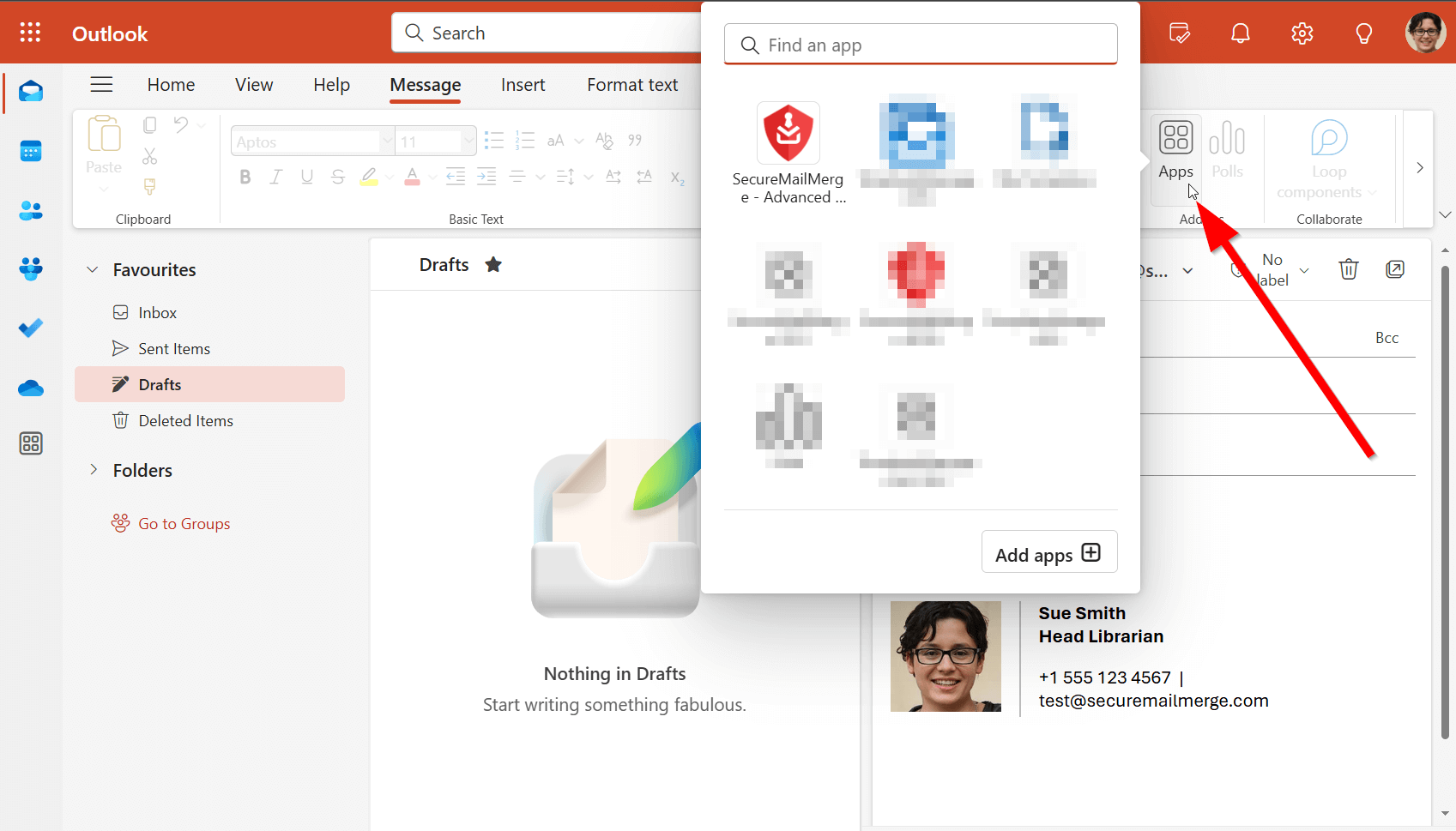
In Outlook, create a new email and choose SecureMailMerge from the “Apps” menu in the compose window. The first time, install it from AppSource or ask your admin to deploy it.
Step 3: Upload your spreadsheet
Select “Upload spreadsheet” and pick your file. Check that the number of recipients shown matches your list.
Step 4: Insert tokens and add attachments
Write your message and insert tokens like {{FirstName}} in the subject and body. For per-recipient files, add an Attachments column with the file names and upload the files when asked.
Step 5: Send a test, then start the campaign
Select “Send test email to yourself” and check the result. When it looks right, select “Start sending campaign”.
Full walkthrough: send your first mail merge campaign or the guide to mail merge in Outlook.
Side-by-side comparison
| Mail Merge Toolkit | SecureMailMerge | |
|---|---|---|
| Runs in | Classic Outlook, Windows | Classic, New Outlook, Mac, web |
| Needs Word | Yes (or Publisher) | No |
| Attachments per recipient | Yes | Yes |
| Generated PDFs | Professional | No |
| Shared mailbox Send As | Professional | Yes |
| Free option | 30-day trial | Free version, footer |
| Price | Annual, per user | Per person who sends |
Last verified: October 2026 against MAPILab’s product page; check before you buy. More tools: mail merge tools comparison and the free Merge Tools add-in alternative.
Is Mail Merge Toolkit free? Trial and pricing compared
Mail Merge Toolkit is not free. After the 30-day trial, MAPILab sells annual per-user subscriptions at $2.50 and $8.25 per user per month (about $30 and $99 a year); its page doesn’t say which edition is which, so confirm at checkout. SecureMailMerge is free with a promotional footer; licences are per person who sends and vary by country, see the pricing page.
Frequently asked questions
Is there a free alternative to Mail Merge Toolkit?
Yes. SecureMailMerge has a free version with every feature and no time limit; it adds a short promotional footer to each email. Mail Merge Toolkit offers a 30-day trial capped at 50 addresses per message.
Does Mail Merge Toolkit work with New Outlook or Outlook for Mac?
Not on Mac: MAPILab says it is not compatible with Microsoft 365 apps for Mac. New Outlook is not listed; it is built for classic Outlook for Windows. Version 7.1 added limited Outlook on the web support.
Can SecureMailMerge create personalised PDFs like Mail Merge Toolkit?
No. SecureMailMerge attaches files you have already created, one or more per recipient, through an Attachments column. For generated, password-protected PDFs, Mail Merge Toolkit Professional is the stronger tool.
Is my data processed locally in both tools?
Yes. MAPILab states all operations run locally. SecureMailMerge processes your spreadsheet inside the add-in and sends through your own Microsoft 365 mailbox.
How much does Mail Merge Toolkit cost?
MAPILab lists two annual subscriptions, $2.50 and $8.25 per user per month billed annually (about $30 and $99 a year), without labelling which edition is which. SecureMailMerge licences are per person who sends and vary by country; see the pricing page.
Do I need Word to use SecureMailMerge?
No. You upload an Excel or CSV file and write the message in Outlook, so it works where Word’s merge doesn’t, including New Outlook and Outlook on the web.
Not affiliated with MAPILab
SecureMailMerge is not affiliated with, endorsed by or sponsored by MAPILab Ltd. Mail Merge Toolkit is a product of MAPILab, named here only to compare features.
Enjoyed this article?
We have a whole library of useful articles for you to read
Show me the library of Outlook articles